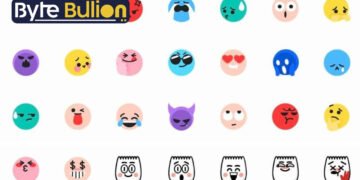



TikTok emoji codes are special shortcodes that unlock a set of 46 exclusive emojis not found on your regular phone keyboard. These emojis first appeared on the app in 2020, and TikTok never made an official announcement about them, which is why users often call them “secret” emojis. You can only access them by typing a specific word inside square brackets, such as [smile] or [cry]. Once you post your comment or caption, the code automatically changes into a small graphic. These emojis have a flat, minimal design that looks the same on every device, whether you use an iPhone or an Android phone. This guide explains what TikTok emoji codes are, how they work, and how you can start using them right away.
What Are TikTok Emoji Codes
TikTok emoji codes are text shortcuts that convert into custom emojis once you publish your post. Unlike standard emojis, which follow the Unicode system used across the internet, these codes are unique to TikTok and only function inside the app. If you type [smile] on Instagram or in a text message, it will simply stay as plain text.
The design style of these emojis sets them apart from typical 3D emojis made by Apple or Google. TikTok’s hidden emojis are flatter and more colorful, giving them a distinct, playful look. This visual identity has helped them become a recognizable part of TikTok culture, especially among younger users who enjoy spotting them in comments and captions.
How to Use TikTok Emoji Codes
Using these codes is simple and does not require any extra app or download. Open TikTok, go to the comment section or start writing a caption, and type a code from the list surrounded by square brackets, like [happy] or [awkward]. When you hit send or post, the code instantly turns into the matching emoji.
It is important to type the code exactly as it appears, including the brackets, or it will not convert. Older versions of the TikTok app may not support all 46 codes, so keeping your app updated helps you access the full collection. These emojis work well in comments, video captions, and direct messages.
Popular TikTok Emoji Codes and Their Meanings
Several codes have become especially popular because of how often creators use them. The [smile] code shows a small pink face and expresses happiness or appreciation, while [happy] displays a wider, more excited expression often used to react to entertaining content. The [cry] emoji appears as a blue face with tears and can mean sadness, but many users also use it to show they are laughing extremely hard.
Other widely used codes include [wronged], which shows a face expressing unfair treatment or mild frustration, and [awkward], which depicts a nervous expression with a sweat drop. The [yummy] code is a popular choice for reacting to food videos. Each of these emojis carries a specific tone, so picking the right one adds personality to your comment without needing extra words.
Why TikTok Emojis Have Become So Popular
Part of the appeal comes from the sense of belonging these emojis create. Because the codes only work on TikTok, using them signals that you are familiar with the platform’s culture rather than posting generic content copied from somewhere else. This detail matters to viewers who value authenticity, especially since TikTok’s audience skews toward Gen Z and Gen Alpha users who notice small platform-specific details.
Businesses and content creators have also started using these emojis to appear more approachable. Instead of writing a formal comment, a brand might reply using [happy] or [smile] to feel more like a real person than a company account. This small shift can encourage more replies and interaction, since followers tend to respond better to accounts that feel human rather than corporate.
Common Mistakes When Using Emoji Codes
One frequent mistake is forgetting the square brackets, which causes the code to remain as plain text instead of converting into an emoji. Another issue happens when users misspell the code, since even a small typo will stop it from working correctly.
Some people also try to use these codes on other apps, expecting them to work the same way, but the codes are exclusive to TikTok. If you copy a code into an email or another social platform, it will just display as bracketed text. Always test a new code within TikTok itself before relying on it in an important post.
Conclusion
TikTok emoji codes offer a fun and simple way to add personality to your comments and captions. By learning the full list of 46 codes and using them correctly, you can make your content feel more native to the platform and connect better with other users.
Frequently Asked Questions
How many hidden TikTok emojis are there?
There are 46 hidden TikTok emojis, each unlocked by a specific shortcode typed inside square brackets.
Do TikTok emoji codes work on other apps?
No, these codes only work within the TikTok app and will appear as plain bracketed text anywhere else.
Why did TikTok create secret emoji codes?
TikTok introduced these emojis in 2020 without an official statement, giving the platform a unique visual style separate from standard system emojis.
Can I use TikTok emoji codes in direct messages?
Yes, you can use them in comments, captions, and direct messages within the TikTok app.
Why won’t my emoji code work?
This usually happens due to a missing bracket, a spelling mistake, or an outdated version of the TikTok app.
Find what’s next and explore more at Byte Bullion