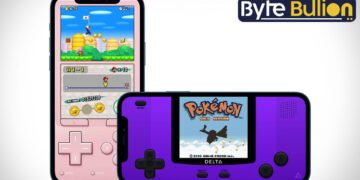



Delta Emulator for iOS is one of the most popular apps for playing classic Nintendo games on an iPhone or iPad. Built by developer Riley Testut, Delta lets you relive old-school titles from systems like Game Boy, NES, SNES, N64, and Nintendo DS, all inside one clean and simple app. Since its official App Store release in 2024, Delta has become the go-to choice for retro gamers who want a safe, easy, and jailbreak-free way to enjoy their favorite childhood games. This article explains what Delta Emulator does, how to get it, and what makes it worth trying in 2026.
What Is Delta Emulator?
Delta is an all-in-one game emulator made specifically for iOS and iPadOS devices. It is the spiritual successor to GBA4iOS, an earlier Game Boy Advance emulator that the same developer created years ago. Instead of focusing on just one gaming system, Delta combines support for several classic consoles into a single app with a smooth, native design that feels right at home on iPhone.
The app is not affiliated with Nintendo in any way, but it gives players a legal way to run their own game files on Apple devices. Delta reached the top of the App Store charts shortly after its official launch, showing just how much demand there was for a trustworthy emulator on iOS.
Key Features of Delta Emulator
Delta stands out because of how much it packs into one app. Users get save states for pausing and resuming games at any point, fast forward for skipping slow sections, and support for a wide range of controllers, including PS4, PS5, Xbox, and Nintendo Switch Pro controllers. The app also offers custom controller skins, automatic game artwork, and 3D Touch shortcuts for quickly jumping back into recent games.
Another major highlight is Delta Sync, a built-in feature that backs up your games, saves, and settings through Google Drive or Dropbox. This means you can switch between an iPhone and an iPad without losing progress. Online multiplayer is also available for Nintendo DS games through community Wi-Fi Connection servers, letting players connect with friends around the world.
Supported Game Systems
Delta currently supports Nintendo Entertainment System, Super Nintendo Entertainment System, Nintendo 64, Game Boy, Game Boy Color, Game Boy Advance, and Nintendo DS. This wide range means users do not need to download separate apps for each console, since everything runs inside one unified library.
A paid tier of the app has also added Sega Genesis support, along with newer additions like RetroAchievements tracking for Game Boy Color, Game Boy Advance, and DS titles. The developer continues to update Delta regularly, with recent versions bringing a redesigned settings menu and interface improvements built for the latest iOS releases.
How to Download Delta Emulator on iOS
The download method depends on your location. Users outside the European Union can get Delta directly from the official Apple App Store, since Apple approved emulator apps in 2024. Simply search for Delta Game Emulator on the App Store, tap install, and open the app once it finishes downloading.
Users inside the European Union need to use AltStore PAL instead, due to regional App Store rules under the Digital Markets Act. This involves installing AltStore PAL on both a computer and an iPhone, then downloading Delta through the AltStore Browse tab. Unlike direct App Store installs, AltStore versions of the app must be refreshed periodically to stay active on the device.
Adding Games to Delta
Once installed, adding games to Delta is straightforward. Players can import their own game files directly into the app through the Files app or by using AirDrop from another Apple device. Delta automatically detects the correct system for each file and organizes it neatly inside the library, complete with matching box art.
It is worth noting that Delta itself does not provide any game files. Users are responsible for only using files they legally own, since downloading copyrighted game content without permission is against the law in most countries.
Is Delta Emulator Safe and Legal?
Delta itself is completely legal, since emulation software is not illegal on its own. Emulators only recreate the hardware of older gaming consoles, similar to how a video player plays different file formats. The app has also passed Apple’s official App Store review process, which adds an extra layer of trust compared to unofficial third-party downloads.
The legal gray area comes from how users obtain their game files. Downloading ROMs of games you do not personally own can violate copyright law, even though owning the emulator app itself is not a problem. To stay on the safe side, it is best to only use game files backed up from cartridges you already own.
Conclusion
Delta Emulator gives iPhone and iPad users a reliable, well-designed way to enjoy classic Nintendo games without jailbreaking their device. With regular updates, strong controller support, and cloud syncing, it remains one of the best retro gaming apps available on iOS in 2026.
Frequently Asked Questions
Is Delta Emulator free to download?
Yes, the core Delta app is free on the App Store, though an optional paid tier unlocks extra features like Sega Genesis support.
Does Delta Emulator work without jailbreaking?
Yes, Delta runs on any standard, non-jailbroken iPhone or iPad through the official App Store or AltStore PAL.
Which game systems does Delta support?
Delta supports NES, SNES, N64, Game Boy, Game Boy Color, Game Boy Advance, and Nintendo DS, with Sega Genesis available in the paid version.
Can I play Delta Emulator games online with friends?
Yes, Delta offers online multiplayer for compatible Nintendo DS games through community Wi-Fi Connection servers.
Is it legal to use Delta Emulator?
Yes, the emulator app itself is legal, but you should only load game files that you personally own to stay within copyright law.
Find what’s next and explore more at Byte Bullion




