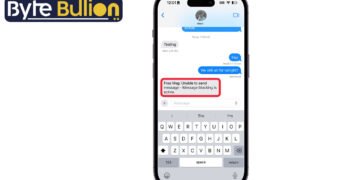



Message blocking is active on iPhone is one of the most common text message errors, and it can be confusing the first time you see it. Instead of your text going through, you get a reply that says something like “Free Msg: Unable to send message – Message Blocking is active.” This guide explains what causes the error, what it really means, and how to fix it so you can get back to texting normally.
What Does “Message Blocking Is Active” Mean?
This error does not mean your iPhone is broken. It means your carrier or the recipient’s carrier has placed a restriction on SMS or MMS messaging for one of the phone numbers involved in the conversation. The message is generated by the carrier’s network, not by the Messages app itself, so it can appear even if your iPhone settings look completely normal.
In most cases, this points to an account issue rather than a technical glitch. A suspended line, an unpaid bill, a parental control setting, or a spam filter can all trigger this response. It is also possible that the person you are texting has blocked commercial or bulk messages on their account, which sometimes affects regular texts too.
Common Causes of Message Blocking on iPhone
Several situations can lead to this error appearing on your screen. An unpaid phone bill or a suspended account is one of the most frequent reasons, since carriers often cut off SMS and MMS services before shutting off calls. A parental control or messaging restriction added by the account holder can also block texts to or from specific numbers.
Carrier-level spam protection is another common trigger, especially if a number has sent a high volume of messages in a short time. Network problems, such as a weak signal or an outdated carrier settings profile on the iPhone, can sometimes produce a similar error as well. In rare cases, duplicate contact entries or corrupted messaging data on the device can interfere with delivery too.
How to Fix Message Blocking Is Active on iPhone
Start with the simplest checks before assuming there is a carrier problem. Restart your iPhone, since a quick reboot resolves many temporary network glitches. Then go to Settings, tap Messages, and select Blocked Contacts to confirm the person you are texting is not on that list.
If the basic checks do not solve it, try sending a text to a different contact to see if the issue is isolated to one person. Turning on Airplane Mode for about 15 seconds and then turning it off again can refresh your connection to the cellular network. You can also update your carrier settings by going to Settings, then General, then About, since a pending update sometimes appears automatically. If the error still shows up after these steps, the block is likely coming from the carrier’s side rather than the phone itself.
When to Contact Your Carrier
If none of the on-device fixes work, the next step is reaching out to your carrier directly. Ask them to confirm your account status and check whether SMS or MMS services are active on your line. Representatives can also tell you if a spam filter or a messaging restriction has been applied to your number.
Carriers like T-Mobile, AT&T, and Verizon each have their own messaging support pages that explain how to lift a block once the account issue is resolved. Keep in mind that some blocks are removed automatically once a bill is paid or a restriction period ends, so checking your account balance is a good first move before calling support.
Conclusion
Message blocking is active on iPhone almost always points to a carrier-side restriction rather than a broken phone. Checking your blocked contacts list, restarting your device, and confirming your account status with your carrier will resolve most cases quickly.
Frequently Asked Questions
Does message blocking mean someone blocked my number?
Not usually. It typically means a carrier restriction is affecting the SMS or MMS service on one of the phones, not that a person has personally blocked your contact.
Why did this happen suddenly on my iPhone after no issues before?
A recent unpaid bill, a new SIM card, or a carrier system update can all trigger this error even if your settings have not changed.
Can a software update fix message blocking?
Sometimes. Updating your iPhone software and carrier settings can resolve glitches, but most cases require a carrier-side fix rather than a phone update.
Will this error affect iMessage as well as regular texts?
No. iMessage works over Wi-Fi or data and is not affected by SMS or MMS blocking, since that block applies only to the cellular messaging service.
How long does it take for a carrier to remove message blocking?
It varies by carrier and reason, but most restrictions are lifted within a few hours to one billing cycle once the underlying account issue is fixed.
Find what’s next and explore more at Byte Bullion




