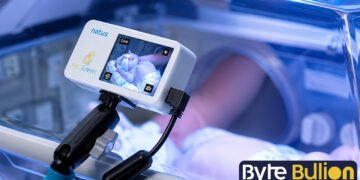



NicView is a secure camera system that lets parents watch their newborn in the Neonatal Intensive Care Unit through a live online video feed. Many hospitals across the United States use this service to help families stay connected to their baby, even when they cannot be at the bedside. A small camera is placed near the baby’s incubator or bed, and parents log in through a private account to view the stream. This guide explains how NicView works, how to log in, and what to expect from the system.
What Is NicView?
NicView is a web-based camera system designed specifically for hospital NICUs. A small camera is mounted beside the baby’s bed or incubator, and it sends a live video stream to a secure online portal. Parents and approved family members can watch this stream from a laptop, tablet, or smartphone, as long as they have an internet connection.
The system does not record video or transmit sound. It only shows a live image, which protects the baby’s privacy and keeps the focus on real-time viewing rather than storage. Hospitals typically fund these cameras through foundations or donor programs, since the goal is emotional support for families during a stressful time.
How Does NicView Work?
Once a baby is settled into a NICU bed with a NicView camera, the hospital staff will ask parents to sign a consent form. This form allows the hospital to activate the camera and issue login credentials for the family. The camera connects to a secure server, and the video travels through encrypted channels similar to the security used by online banking websites.
After parents receive their username and password, they can log in from any device with internet access. The video feed remains active most of the day, but it may go offline temporarily during medical procedures, feedings, or nursing care. This offline period protects the baby and staff from unnecessary exposure, and the screen will simply display an offline message until the feed returns.
How to Log In to NicView
Logging into NicView is simple once a hospital provides the necessary credentials. Parents can visit the official website at www.nicview.net and enter the username and password given to them after signing the consent form. Some hospitals also offer a mobile app version, which works the same way but is designed for smartphones and tablets.
The first time someone logs in from a new device, the system may ask for a one-time consent confirmation. This step verifies that the person viewing the stream is authorized by the parents. Login credentials should never be shared outside of trusted family members, since anyone with the username and password can view the baby’s live feed.
Who Can Access the Camera Feed?
Only people who receive login details directly from the parents can view the baby’s stream. Parents decide who gets access, whether that includes grandparents, siblings, or close friends who live far away. This control helps families manage privacy while still allowing loved ones to feel included in the baby’s care.
Hospitals do not share these credentials with anyone outside the family, and NicView itself does not store patient video or personal health information. This setup gives parents full authority over who sees their child, which is especially helpful for families who cannot all travel to the hospital during a long NICU stay.
Why Hospitals Use NicView
NICU stays can last for weeks or even months, and many parents cannot remain at the hospital around the clock due to work, other children, or their own recovery after childbirth. NicView gives these parents a way to check on their baby throughout the day without physically being present. This connection has been shown to ease anxiety and support bonding between parents and their newborn.
A study on web-based NICU cameras found that nearly all parents felt more connected to their baby after using the service regularly. Working parents and family members living far from the hospital used the camera most often, which shows how valuable remote access can be for maintaining a sense of closeness during a difficult time.
Common Issues and Troubleshooting
Sometimes the camera image may look darker than expected, especially if a blanket covers the incubator to block bright light. If the baby is receiving phototherapy for jaundice, the video color may also appear distorted due to the special lighting used for treatment. These changes are normal and do not indicate a problem with the camera itself.
If the camera angle needs adjustment or parents experience technical trouble logging in, most hospitals provide 24/7 technical support through a dedicated phone line. Support teams can often reposition the camera remotely without needing a nurse to physically adjust it, which keeps the process quick and convenient for families.
Conclusion
NicView gives NICU families a simple, secure way to stay close to their baby, even from a distance. By understanding how the login process works and what to expect from the live feed, parents can use this tool with confidence during their baby’s hospital stay. When in doubt, hospital staff and NicView’s support line remain available to help.
Frequently Asked Questions
Is NicView available at every hospital?
No, NicView is only available at hospitals that have purchased and installed the camera system in their NICU.
Does NicView record video or audio?
No, NicView only streams live video. It does not record footage or transmit any sound.
Can I access NicView from my phone?
Yes, NicView works on smartphones, tablets, and computers as long as you have an internet connection.
Why is my NicView camera showing offline?
The camera goes offline during medical procedures or nursing care to protect the baby’s privacy and safety.
Who do I contact if I forget my NicView password?
Contact your hospital’s NicView support line or use the “Forgot Username and Password” link on the login page.
Find what’s next and explore more at Byte Bullion




