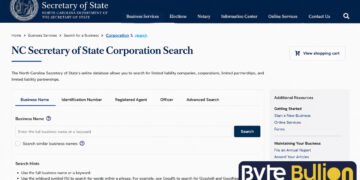



The NC Secretary of State corporation search is the official tool for finding business records in North Carolina. It lets anyone check if a company is registered, active, or dissolved. Investors, attorneys, and business owners use this free database every day to confirm facts before signing contracts or forming a new company. This guide explains how the search works, what information it shows, and how to use it correctly.
What Is the NC Secretary of State Business Search?
The North Carolina Business Entity Search is an online database run by the Business Registration Division of the Secretary of State’s office. It holds records for every corporation, LLC, partnership, and nonprofit registered to do business in the state. The tool is free and available at sosnc.gov around the clock.
You can search by company name, SOSID number, registered agent, or company official. Once you find a match, the record shows filing history, entity status, and formation date. The database updates within about 24 hours of new filings, so results stay current.
How to Search for a Corporation in North Carolina
Start by visiting the official search page at sosnc.gov. Select the entity type you want, such as corporation, LLC, or nonprofit, then type the company name into the search box. The system will show a list of matching entities in tabbed rows below the search bar.
Click the plus sign next to the entity you want to review. This expands the record and shows basic filing details. Select “More Information” to see full history, and click “View Filings” to review every document the company has submitted to the state. This includes articles of incorporation, annual reports, and any name changes.
What Information You Can Find
A typical search result includes the entity’s legal name, SOSID number, formation date, and current status, such as active, dissolved, or administratively forfeited. It also lists the registered agent’s name and address, since North Carolina law requires every registered business to keep one on file. This agent must have a physical address in the state and is responsible for receiving legal documents.
The record also shows a full filing history, including annual reports and any amendments. This history helps confirm whether a company has stayed compliant with state requirements or has fallen behind on paperwork, which is useful information during due diligence or before entering a business agreement.
Types of Entities in the Database
North Carolina’s registry covers several business structures, each with its own filing rules. Corporations, both domestic and foreign, appear alongside limited liability companies, which remain the most commonly searched entity type. Limited partnerships and limited liability partnerships, often used by law firms and accounting practices, are also included.
Nonprofit corporations, professional LLCs, and professional corporations round out the list. Professional entities, used by licensed workers like doctors, dentists, and engineers, must include designators such as “PLLC” or “PA” in their names. Sole proprietorships and general partnerships typically do not appear in this database, since they are not required to register with the state.
Checking Name Availability
Before registering a new business, you should confirm that your desired name is available. North Carolina requires every business name to be distinguishable from existing registered entities, including reserved names and limited partnerships. Names containing restricted words like “bank” or “trust” require special approval from the appropriate regulatory agency.
If you find your name is available, you can reserve it for 120 days by filing an Application to Reserve a Business Entity Name and paying the required fee. This step is optional but useful if you are not ready to file formation documents right away.
Annual Reports and Compliance
Most registered entities must file an annual report to stay in good standing. LLCs and foreign LLCs owe theirs by April 15 each year, with a filing fee of $203 online or $200 by paper. Corporations file by the 15th day of the fourth month after their fiscal year ends, at a lower fee of $20 online or $25 by paper.
Limited liability partnerships follow the same April 15 deadline as LLCs, while professional LLCs and professional corporations are exempt from this requirement. Missing a deadline can lead to a notice period, followed by administrative dissolution if the issue is not corrected. Checking a company’s filing history in the search tool is a quick way to spot these problems early.
What the Search Does Not Cover
The Secretary of State’s database does not include assumed business names, also known as DBAs. Those records are kept at the county level, so you must search the Register of Deeds office in the county where the business operates. The same applies to UCC filings tied to real estate, which are handled locally rather than through the state registry.
Sole proprietorships and unregistered general partnerships also fall outside this system. If you need a complete picture of a business, especially one involving property or informal partnerships, plan to check both the state database and the relevant county records.
Conclusion
The NC Secretary of State corporation search gives anyone a fast, free way to verify business records in North Carolina. Whether you are forming a new company, checking a potential partner, or confirming compliance, this tool provides accurate and current information straight from the state. Pair it with county records when you need details on DBAs or local filings.
Frequently Asked Questions
Is the NC Secretary of State business search free to use?
Yes, the search tool is completely free and available online at sosnc.gov at any time.
How current is the information in the database?
Records typically update within 24 hours after a new filing is submitted to the Secretary of State.
Can I find a sole proprietorship in this search?
No, sole proprietorships and unregistered general partnerships do not appear because they are not required to register with the state.
How long can I reserve a business name in North Carolina?
You can reserve an available business name for 120 days by filing an application and paying the required fee.
Where do I find DBA or assumed business name records?
DBA records are kept at the county level, so you need to search the Register of Deeds office where the business operates.
Find what’s next and explore more at Byte Bullion




